Skip Lovable. My Favorite Way to Vibe-Code is Claude Code + Cloudflare Workers
• public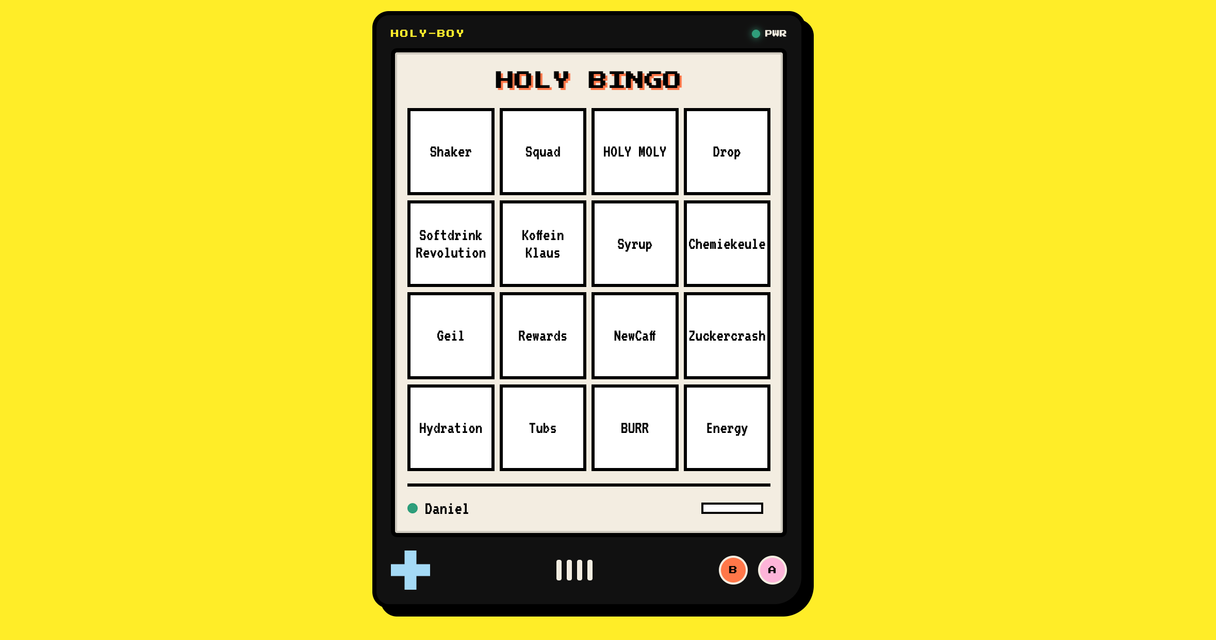
Right now, if you want to throw together a little app over a weekend, the internet has one answer. Lovable. Or, if you're slightly more technical, Claude Code pointed at Supabase and shipped on Vercel. Every vibe-coding thread, every "I built this in a weekend" post, every starter template. That's the stack everyone's on.
I went a different way, and I keep going back to it.
Last weekend I built an invite site for a summer party. A guest list, a personal link for each person, an RSVP form people could come back and edit later, and a little admin page so I could see who was coming and how many kids they were dragging along. It cost nothing to run. It took an afternoon. I barely wrote any of it. Claude Code did, while I described what I wanted and occasionally said "no, not like that."
Yesterday I built a bingo game for an internal team event. Alone, in one evening. Same setup, same near-zero effort, way too much fun for what it was.
What stuck with me afterwards wasn't either app. It was how well the stack and the agent fit together. Cloudflare's tiny serverless setup and Claude Code turn out to be one of those pairings where each one covers the other's weakness. If you've been looking for a low-stakes place to actually point a coding agent at something real, this is the one I'd send you to. And it's not the one everyone's talking about.
The Default Stack, and Why I Keep Skipping It
I'm not here to dunk on Lovable, Supabase, or Vercel. They're good. For a real product, with real users, real auth, and actual scale, that's exactly where I'd go.
But for a fun little app? It's a lot. Lovable hides everything behind a nice UI, which is great until you want to understand what it actually built. The Claude Code + Supabase + Vercel combo is more honest, but now you've got a frontend framework, a backend, a build step, a Postgres instance, environment variables in three places, and a dashboard for each. For a party invite, that's a surprising amount of machinery to babysit.
And here's the part nobody mentions: all that machinery is hard on the agent too. The more sprawling the project, the more Claude has to guess, and guessing is where it goes wrong.
So I kept reaching for something dumber. A folder, a database, and an agent. On Cloudflare.
The Stack, In Plain Terms
You don't need to know much going in. The whole thing is basically four pieces:
- One file that's your backend. It decides what to send back when someone visits, and it talks to the database. That's it.
- A database that's just there. SQLite, built in, no separate server to spin up.
- A folder of plain HTML. Your actual page. The kind of web page that's worked since 1995.
- One command to ship it. You type
wrangler deployand it's live on the internet at a real address.
No framework. No build step. No npm run build that takes two minutes and fails for reasons nobody can explain. You edit a file, you ship it. For a small personal app it's genuinely free, not "free with an asterisk," because you'd have to work pretty hard to blow past 100,000 requests a day.
That's the part you can find on Cloudflare's site. The interesting bit is what happens when you point an agent at it.
Why It's Such a Good Playground for Claude Code
The whole app fits in the agent's head. This is the big one. A normal web project is a sprawl, and an agent working inside it has to hold a frontend framework, a backend, a build config, and a hundred dependencies all at once. Here, the entire app is maybe three files. Claude can read all of it, hold all of it, and reason about all of it in one go. There's nowhere for a bug to hide.
The feedback loop is short. Change the file, run it locally, see it work. Or just deploy. No rebuild, no container to restart, no waiting. Claude makes a change and you check it in seconds, which means you catch the wrong turns early instead of ten steps later.
The constraints help the agent, not just you. Cloudflare Workers run on plain web APIs, the same fetch and Request and Response browsers have used forever. That's some of the most documented, most-trained-on code on the planet. You're not asking the model to be clever with a niche framework it half-remembers. You're asking it to write the boring, common stuff it has seen a million times. That's exactly where these tools are strongest.
It's cheap enough to be reckless. This matters more than it sounds. When deploying is free and instant and nothing's at stake, you stop being precious about it. You let the agent try the weird idea. You throw the whole thing away and start over. You learn by breaking things, which is the only way anyone actually learns this stuff. A playground works because falling off the slide doesn't cost you anything.
You hand it the rules once. Claude Code reads a file called CLAUDE.md and treats it as standing instructions. Write down how the stack works, the gotchas, the commands, and Claude stops rediscovering them every session. Mine is at the bottom of this post. Drop it into a fresh folder and the agent already knows the game.
The honest version: this stack is simple enough that you can fully understand what the agent did, and that's the whole point. You're not handing your judgment to a black box the way you do with Lovable. You're moving fast with something that handles the typing while you keep the plot.
Stuff Worth Building
The party invite was a good first project. Here are others that fit this stack, roughly in order of effort. The theme is fun and low-stakes on purpose. That's the point.
- An invite site. A guest list, a form, an admin view. Works for a summer party or a wedding. Good first project because it touches everything: a database, a form that writes to it, a page that reads it back.
- A link shortener with QR codes. Paste a long URL, get a short one, plus a QR code and a history of everything you've shortened. Teaches you routing and the database in about thirty lines, and you'll actually use it.
- A bingo game. The one I built in an evening for a team event. Surprisingly easy, surprisingly fun, and a good reminder that "internal tool" doesn't have to be boring.
- A "who's bringing what" list. For a potluck or a trip. Everyone opens the same page, claims a thing, ticks it off. This is where you start wanting live updates, which is a nice problem to grow into.
- A rating thing for your friends group. Books, films, restaurants, whatever you argue about. Everyone rates, you see the group average. Cheaper than starting another Letterboxd nobody finishes.
- A planner or to-do app for your flat. The one you keep meaning to build because no existing app fits how you and your flatmates (or your partner) actually split things up. Now you can shape it exactly, no subscription.
Pick one. Open the folder. Tell Claude what you want and see where it takes you. Worst case, you lose an evening and learn how a web request actually works, which isn't really a loss.
Getting Started
Two things to install once, then you're off:
npm install -g wrangler
wrangler login
That opens a browser and connects the Cloudflare CLI to your account. Sign up if you don't have one. It's free.
Then drop the file below into your project as CLAUDE.md. It's the map Claude Code uses to get around this kind of app: the architecture, the commands, the one gotcha that bites everyone (your local and production databases don't talk to each other), and the conventions worth keeping. With it in place, you can open a fresh folder and just start describing what you want.
The Bottom Line
For real products, the heavy stack earns its weight. For everything else, here's where I've landed:
- I stopped reaching for Lovable and the Supabase + Vercel combo for small stuff.
- A folder, a database, and an agent on Cloudflare does the job, for free, in an afternoon.
- The same simplicity that makes it cheap is what makes Claude Code good at it.
Try one fun thing on it. That's the whole pitch.
The CLAUDE.md File (copy this into your project)
# Simple Cloudflare Web App

A pattern for tiny, free-to-host web apps: one Worker, one database, a folder of static
files, deployed with one command. No framework, no build step, no server to maintain.
This file documents the toolstack and conventions so you can work in any app built this way.

## Stack at a glance

| Concern        | Tool                          | Notes                                            |
| -------------- | ----------------------------- | ------------------------------------------------ |
| Compute / API  | Cloudflare Workers            | Single `fetch` handler acts as router + backend  |
| Database       | Cloudflare D1 (SQLite)        | Bound to the Worker as `env.DB`                   |
| Frontend       | Static files in `public/`     | Plain HTML/CSS/JS, served via the `ASSETS` binding |
| Tooling / CLI  | Wrangler                      | Dev server, DB migrations, secrets, deploy        |
| Hosting        | `*.workers.dev` or custom domain | Free tier covers everything at this scale      |

**No build step.** The frontend is hand-written HTML/JS served as-is. The Worker is a single
`.js` (or `.ts`) file. There's no bundler, no `dist/`, no `npm run build`. Edit a file, run `wrangler deploy`.

## Architecture

```
Browser ──> Worker (src/worker.js)
              |-- GET /            -> serve public/index.html via env.ASSETS
              |-- GET/POST /api/*  -> JSON handlers, read/write env.DB
              `-- everything else  -> fall through to static assets
```

The Worker is the single entry point. It inspects `new URL(request.url).pathname`, routes
`/api/*` to JSON handlers, and forwards everything else to the static `ASSETS` binding.
State lives in D1; the frontend talks to the app exclusively through `/api/*` endpoints.

### Worker shape

```js
export default {
  async fetch(request, env, ctx) {
    const url = new URL(request.url);
    // 1. handle OPTIONS / CORS
    // 2. route /api/* to handlers, passing `env`
    // 3. otherwise: return env.ASSETS.fetch(request)
  }
};
```

- `env` carries every binding: `env.DB`, `env.ASSETS`, and any secrets (e.g. `env.ADMIN_KEY`).
- Use the **Web platform API** (`fetch`, `Request`, `Response`, `URL`, `crypto.subtle`,
  `TextEncoder`). Node built-ins (`fs`, `path`, `process`) are **not** available unless you
  set `compatibility_flags = ["nodejs_compat"]`, so prefer not needing them.
- D1 query pattern: `await env.DB.prepare("SELECT * FROM t WHERE id = ?").bind(id).all()`.
  Always use `.bind()` for parameters, never string-interpolate user input into SQL.

## Project layout

```
.
├── public/
│   └── index.html        # whole frontend (often a single file)
├── src/
│   └── worker.js         # router + API + static-asset fallthrough
├── schema.sql            # D1 table definitions (CREATE TABLE IF NOT EXISTS ...)
├── seed.sql              # optional local sample data
├── wrangler.toml         # Cloudflare config: bindings, name, entry point
├── .dev.vars             # local-only secrets (gitignored, never deployed)
└── package.json          # npm scripts wrapping wrangler
```

## Configuration (`wrangler.toml`)

```toml
name = "<app>"
main = "src/worker.js"
compatibility_date = "2025-01-01"   # pin a date; controls runtime behavior

[assets]
directory = "./public"
binding = "ASSETS"

[[d1_databases]]
binding = "DB"
database_name = "<app>-db"
database_id = "..."                  # from `wrangler d1 create`
```

- **Bindings are how the Worker reaches resources.** A binding name (`DB`, `ASSETS`) becomes
  a property on `env`. Add a new resource, add a binding, and it shows up on `env`.
- `database_id` comes from `wrangler d1 create <app>-db` and must be committed for deploys to work.

## Secrets

Two places, never mixed up:

- **Local dev:** put secrets in `.dev.vars` (`KEY=value`, gitignored). Wrangler loads them
  into `env` automatically when you run `wrangler dev`.
- **Production:** `wrangler secret put KEY` (prompts for the value, stores it encrypted in
  Cloudflare). Secrets are **not** in `wrangler.toml` and never committed.

Same `env.KEY` accessor in code regardless of source.

## Commands

Conventionally wrapped as npm scripts in `package.json`:

```jsonc
{
  "scripts": {
    "dev":           "wrangler dev",
    "db:init":       "wrangler d1 execute <app>-db --local  --file=schema.sql",
    "db:seed":       "wrangler d1 execute <app>-db --local  --file=seed.sql",
    "db:reset":      "rm -rf .wrangler/state/v3/d1 && wrangler d1 execute <app>-db --local --file=schema.sql && wrangler d1 execute <app>-db --local --file=seed.sql",
    "db:query":      "wrangler d1 execute <app>-db --local  --command",
    "deploy":        "wrangler deploy",
    "deploy:schema": "wrangler d1 execute <app>-db --remote --file=schema.sql"
  }
}
```

One-time setup:

```bash
npm install -g wrangler        # or use the local devDependency
wrangler login                 # browser auth against your Cloudflare account
wrangler d1 create <app>-db    # prints the database_id, paste it into wrangler.toml
```

## Local vs. Remote: the #1 Gotcha

D1 has **two separate databases** and `wrangler` defaults differ by command:

- `--local` is a SQLite file under `.wrangler/state/`. This is what `wrangler dev` uses.
- `--remote` is the real production D1 in Cloudflare.

They do **not** sync. Schema or seed changes you make locally are invisible in production
until you re-run with `--remote`, and vice-versa. After deploying for the first time (or after
any schema change), apply the schema remotely:

```bash
wrangler d1 execute <app>-db --remote --file=schema.sql
```

Same trap applies to data: `--local` edits never reach users; `--remote` edits hit live data.

## Deploy

```bash
wrangler deploy            # uploads Worker + public/ assets, prints the live URL
```

The first deploy gives you `https://<app>.<your-subdomain>.workers.dev`. A custom domain is
optional: Cloudflare dashboard > your Worker > Settings > Domains & Routes (free if the
domain's nameservers are on Cloudflare).

## Schema changes / migrations

There's no migration framework. Keep `schema.sql` idempotent (`CREATE TABLE IF NOT EXISTS`,
`CREATE INDEX IF NOT EXISTS`) so re-running it is safe. For column additions on an existing
deployment, run an explicit `ALTER TABLE` against both `--local` and `--remote`, and note it
as a comment in `schema.sql` so the history is visible:

```bash
wrangler d1 execute <app>-db --remote --command="ALTER TABLE t ADD COLUMN x TEXT"
```

## Conventions

- **Validate and sanitize all input** in the Worker before touching D1. It's the only
  trust boundary. Clamp numbers, allowlist enums, reject unexpected shapes.
- **Parameterize every query** with `.bind()`; never interpolate user input into SQL.
- **Gate admin/privileged endpoints** on a secret (header or query param checked against
  `env.SOMETHING`), since there's no user auth layer by default.
- **Return JSON consistently** with a small `json(data, status)` helper and shared CORS
  headers to keep handlers terse.
- **Keep the frontend dependency-free** where possible: one HTML file, inline or co-located
  CSS/JS, `fetch()` to `/api/*`. The whole point of this stack is that there's nothing to build.

## Free-tier reality check

Workers: 100,000 requests/day. D1: 5 GB storage, millions of reads/day. For a low-traffic
personal app this is effectively unlimited, so expect about €0/month.